

DIGITAL WEIGHBRIDGE SYSTEM
Modernize Your Weighbridge Operations
WeighX helps businesses digitize weighing operations with real-time monitoring, device integration, structured workflows, and centralized data.
A modern digital platform for weighbridge operations
WeighX connects weighing operations, vehicle identification, digital workflows, monitoring, approvals, and business systems into one integrated platform.
Real-Time
Real-time weight and operational monitoring.
Integrated
Connect weighbridge devices, NFC, CCTV, and business systems.
Controlled
Role-based access and approval workflows.
Scalable
Designed to evolve with future automation and integration requirements.

THE CHALLENGE
Modern Weighbridge Operations Need More Than Digital Scales
Weighbridge operations involve more than simply reading vehicle weight.
Vehicle identification, transaction validation, documentation, monitoring, CCTV, approvals, and business system integration need to work together as one consistent process.
When these processes remain manual or disconnected, operational visibility and data consistency become more difficult to maintain.

THE SOLUTION
One Platform for Connected Weighbridge Operations
WeighX brings weighing operations and operational information together in one digital platform.
From vehicle identification to transaction completion, every stage can be managed through a structured digital workflow.
Available today
All eight capabilities below are in use today; those marked Enterprise Edition sit outside the base package. Anything still planned is kept separate, in the Roadmap section.
Real-Time Weight Monitoring
Monitor vehicle weight in real time with clear scale status indicators.
NFC Integration
Enterprise EditionIdentify and retrieve transaction data through NFC integration.
CCTV Integration
Enterprise EditionConnect visual monitoring with weighing operations for operational documentation.
Inbound & Outbound
Manage inbound and outbound vehicle workflows in one system.
Approval Workflow
Manage approval processes based on roles and business rules.
Operational Dashboard
Gain centralized visibility into weighing activities and transactions.
Role-Based Access
Control user access based on roles and authorization.
System Integration
Ready to integrate with APIs, ERP, SAP, and other business systems.
DIGITAL WEIGHING WORKFLOW
From Vehicle Arrival to Completed Transaction
01
Vehicle Arrives
The vehicle enters the weighbridge area and the weighing queue begins.
02
Vehicle Identification
Vehicle, driver, and transporter are matched against master data.
03
NFC / SPB Validation
The NFC card or delivery note is read and validated.
04
T1 Weighing
The first weighing is captured from the indicator, along with its stability status.
05
Transaction Validation
Load details, documents, and transaction completeness are checked.
06
T2 Weighing
The second weighing is captured after the load is discharged or loaded.
07
Net Weight Calculation
Net weight is calculated from the T1/T2 difference and any applicable deductions.
08
Approval
The transaction is routed to approvers according to role and rules.
09
Transaction Completed
The weighing ticket is issued and the transaction is locked with its audit trail.
10
ERP / SAP Integration
Transaction data is ready to flow to business systems through an agreed integration.
CONNECTED OPERATIONS
Connect Your Devices to a Digital Platform
Weighbridge Indicator
Weight read directly from the scale indicator, with stable and unstable status.
NFC Reader
Enterprise EditionNFC card reading for transaction identification at the weighing point.
CCTV
Enterprise EditionSnapshots from cameras installed around the weighbridge area.
IoT / Device Gateway
A device gateway connecting field hardware to the platform.
Gate Barrier
Roadmap — automatic barrier control is not available yet.
Real-Time Weight at the Operator's Fingertips
WeighX captures and displays weight data in real time, allowing operators to monitor weighing directly from the application.
Scale status
STABLE and UNSTABLE status is shown as it is — the operator knows when a reading can be used.
NFC identification
Enterprise EditionNFC card reading helps identify transaction data quickly and consistently, and reduces manual input.
CCTV monitoring
Enterprise EditionCCTV integration helps operators monitor the weighbridge area and supports transaction documentation.

FIELD APP
Gate and Estate Data Arrives Without Waiting for Paper
WeighX Field is an Android app for security staff, foremen, and supervisors, available in the Enterprise Edition. Weighing stays at the weighbridge: weight only comes from the indicator and is never typed on a phone.
Gate post
Security staff log departing trucks and check the weighing queue on a phone, without walking back to the operator room.
Harvest and delivery notes
Foremen record harvests, attendance, and fruit delivery notes on site, and each note is matched to its weighing ticket at the mill.
Deviation approvals
Supervisors decide tare deviations from their phone, through the same inbox as the web app, without needing to be at a desk.
Works without signal
Estate records made without signal are kept on the phone and sent once the connection returns, with nothing to re-enter.

WEIGHX FIELD FOR RAMPS
Ramp Owners See Today's Payouts From Their Phone
The purchase feed lists every note fully weighed today: the farmer, the paid net weight, and the amount. Notes already paid out are kept apart from those that can still be stopped.
Loads sent to the mill stay visible until the mill slip comes back. The mill ticket number and mill net weight are entered on the phone, and the server works out the difference.

Mill Shrinkage and Farmer Advances, Without Opening a Report
The mill difference screen compares ramp net weight with mill net weight over the last 30 days, mill by mill. Shrinkage the mill declared on its slip is shown apart from shrinkage it never explained, together with the money that did not come in.
The advances screen shows each farmer's outstanding balance against their limit and the deduction taken per note. Only authorised users can change a limit.
The ramp screens are available in the Enterprise Edition as the Ramp module and need a connection. Weighing still happens on the ramp's weighbridge, not on the phone.

OPERATIONAL VISIBILITY
Better Visibility Into Your Weighing Operations
The WeighX dashboard provides visibility into weighing activities, transactions, process status, and operational information.
WeighX screens
Real WeighX screenshots, shown with sample data.
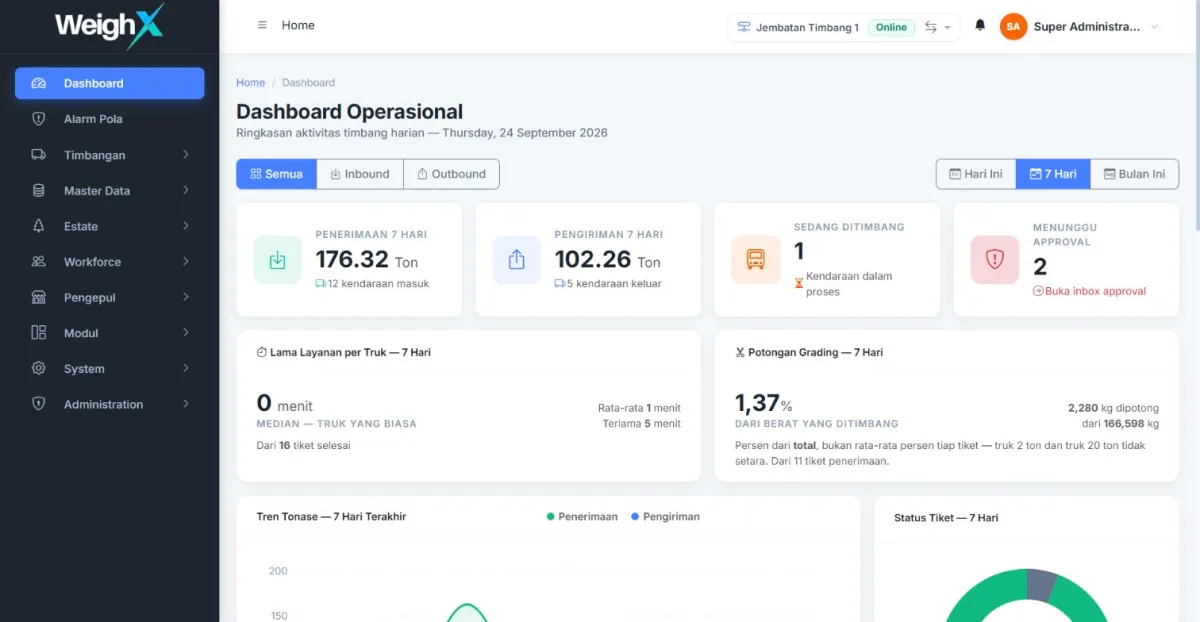
Dashboard — a summary of weighing activity and transactions. 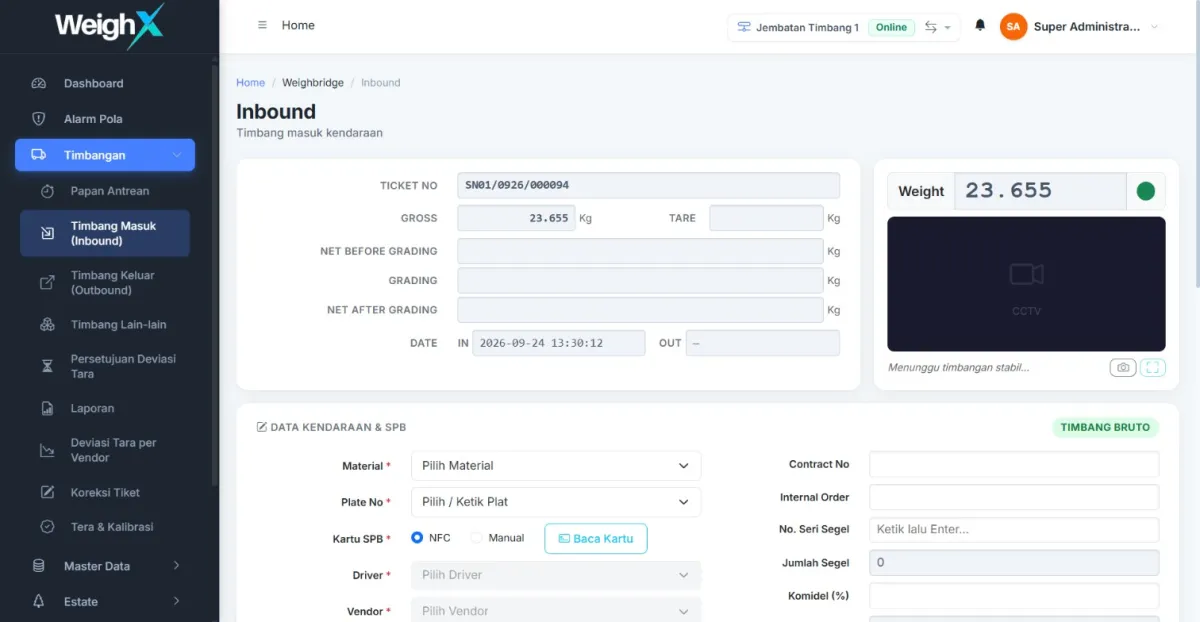
Weighing screen — the T1 and T2 weighing process. 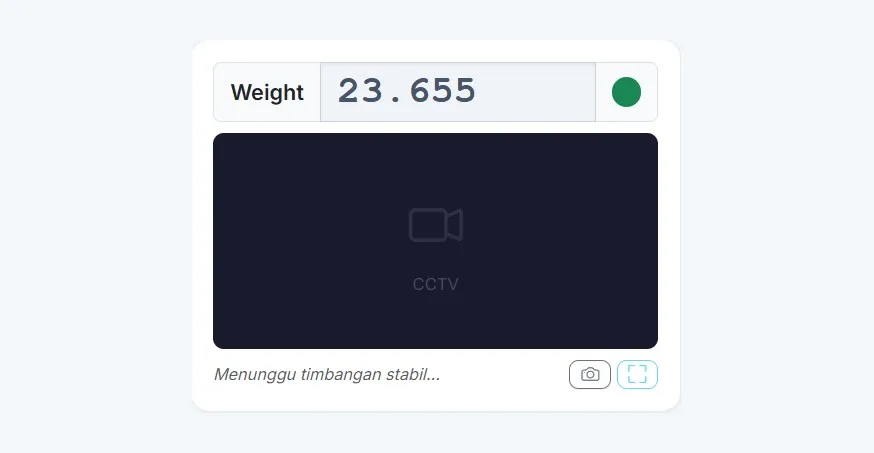
Live weight — indicator readings with their stability status. 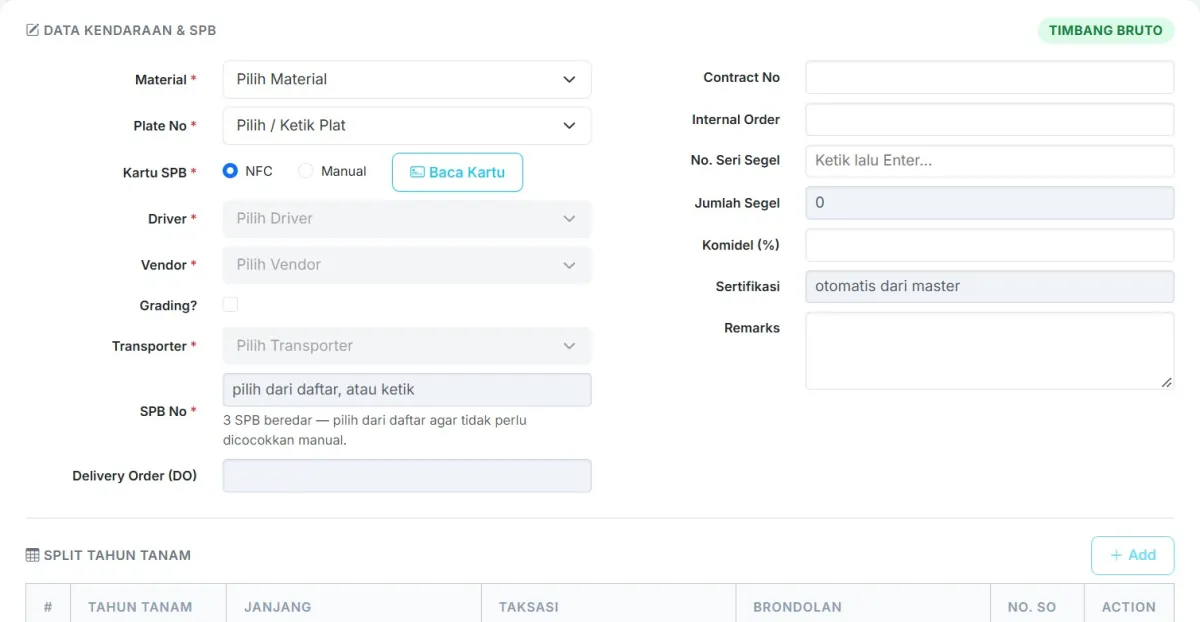
NFC — card reading and transaction identification. 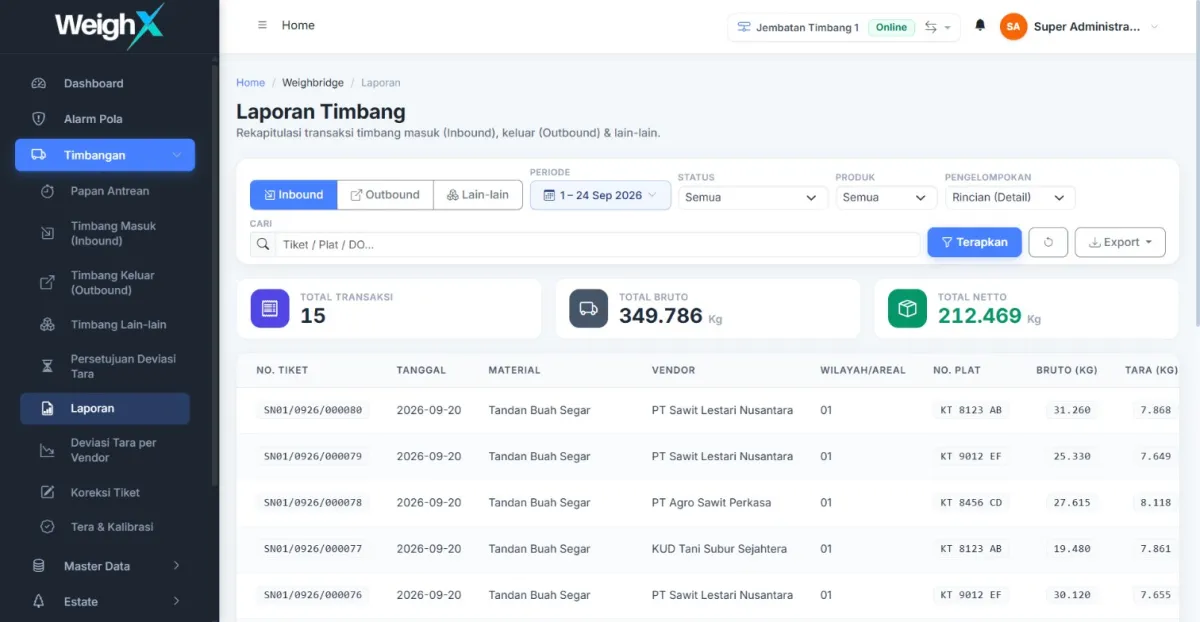
Transactions — the list of weighing tickets and their status. 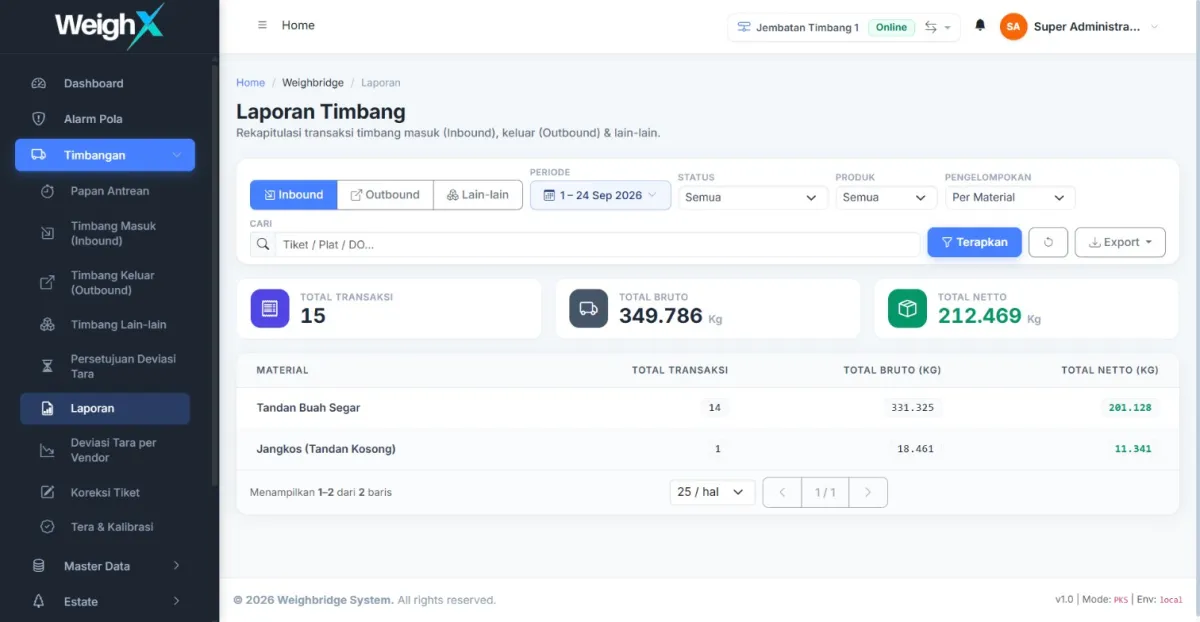
Reporting — a recap of weighing activity.


Access Control Built Around Your Organization
WeighX supports user, role, and authorization management to help ensure users access the functions relevant to their responsibilities.
User Management
User account management, including active status.
Role Management
Roles that can be shaped around your operational team structure.
Authorization
Permissions per function, not only per screen.
Approval Workflow
Approval paths that follow the business rules in force.
Transaction History
Transaction history and changes are kept as an audit trail.
INTEGRATION READY
Designed to Connect With Your Business Ecosystem
WeighX is designed with an integration-ready approach that allows it to evolve and connect with business systems and devices.
ERP
Weighing transaction data is ready to flow into the ERP your company uses.
SAP
The same integration pattern applies to SAP landscapes, following each technical agreement.
API
Data exchange over APIs, for internal and third-party systems alike.
How WeighX Is Layered, From Field to Business System
Layer 1
Weighbridge
Scale indicator, NFC reader, CCTV, and other devices around the weighing area.
Layer 2
Device Gateway
The bridge between field devices and the platform, including when the network drops briefly.
Layer 3
WeighX
Workflow, transactions, dashboard, users, approvals, and reporting.
Layer 4
Business Integration
APIs, ERP, SAP, and the other business systems that receive its transaction data.
What Changes With WeighX?
Less Manual Work
Reduce manual input across operational processes.
Better Visibility
Get centralized visibility into weighing operations.
More Consistent Processes
Use structured and controlled digital workflows.
Connected Operations
Connect devices and business systems within one digital ecosystem.
Ready to Scale
Build a digital foundation that can evolve with your business needs.
Built for Operations With Complex Weighing Processes
Palm Oil Mills
Digitalize weighing operations across inbound and outbound processes.
Industrial Operations
Improve visibility and process control around weighing activities.
Logistics
Connect vehicle movement, weighing, and transaction information.
Multi-Site Operations
Create a foundation for centralized digital weighing management.
ROADMAP
Built for Today's Operations. Ready for Tomorrow.
None of the six capabilities below are available yet. They are still planned, and listed here so the product direction is clear — not as part of what is offered today.
ANPR
Roadmap — automatic number plate recognition.
Automatic Gate Barrier
Roadmap — automatic barrier control tied to transaction status.
Self-Service Weighbridge
Roadmap — unattended weighing without an operator at the scale.
Advanced Analytics
Roadmap — deeper analysis of weighing data.
AI-assisted Operations
Roadmap — AI assistance within weighing operations.
Predictive Insights
Roadmap — forecasting based on operational data patterns.
See How WeighX Can Work for Your Operation
Every operation is different. Let's discuss how WeighX can fit your business processes and integration requirements.
READY TO GO DIGITAL?
It's Time to Modernize Your Weighbridge Operations
Talk with the MARDAYA team about your weighbridge digitalization and integration requirements.